Vectorcart v6.0 Pro Suite
The Ultimate Retail Engine. 24/7 Monitoring + Stealth Execution in Chrome.
Vectorcart pairs an execution-first Chrome extension with a powerful dashboard. Deploy persistent background monitoring, advanced Shopify Queue Bypass, and local captcha harvesting—all from one elite command center.
Unified support for
Shopify (Bypass),
Nike,
Amazon,
Walmart,
Best Buy, and more. Powered by our extension-first architecture. Already have access?
Log in here.
Elite
Shopify Queue Bypass
24/7
Background Monitoring
Native
Chrome Extension
Fast
Local Captcha Solver
How It Works
Command from the cloud. Execute on the page.
Don't lose speed to clunky setups. Our extension works instantly on the retailer's active page, while your dashboard gives you a bird's-eye view of your ongoing tasks, approvals, and performance logs.
UI Proof
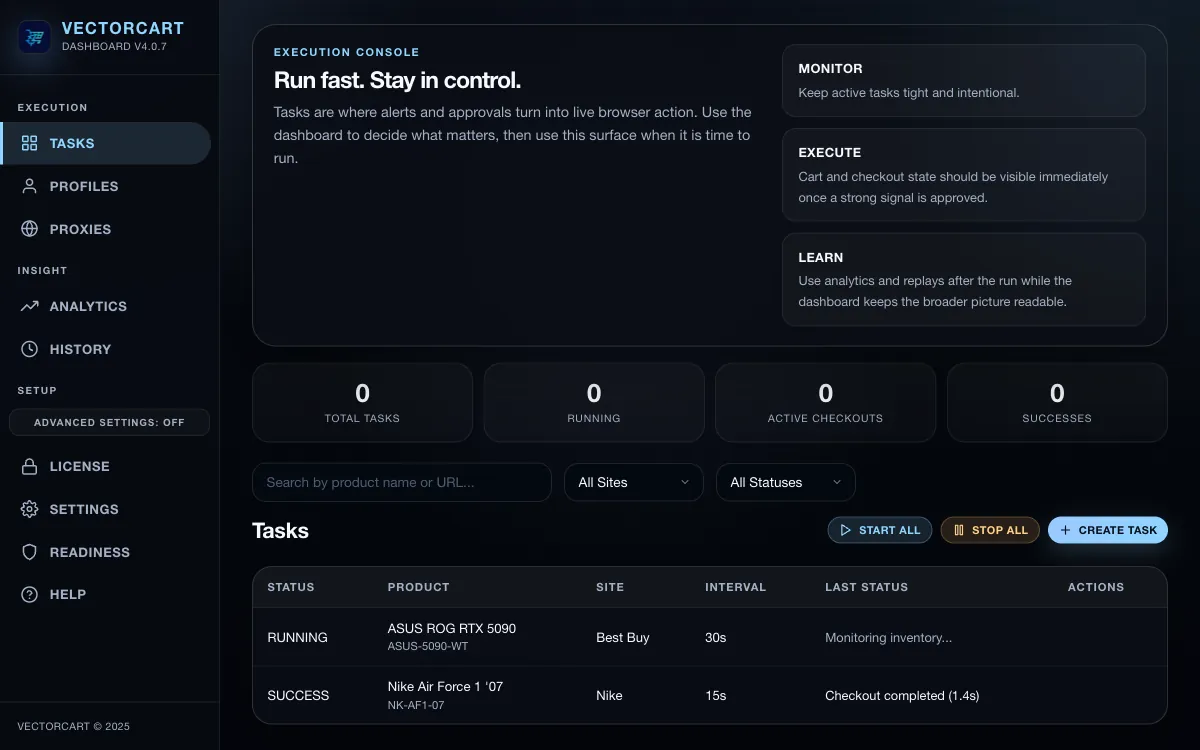
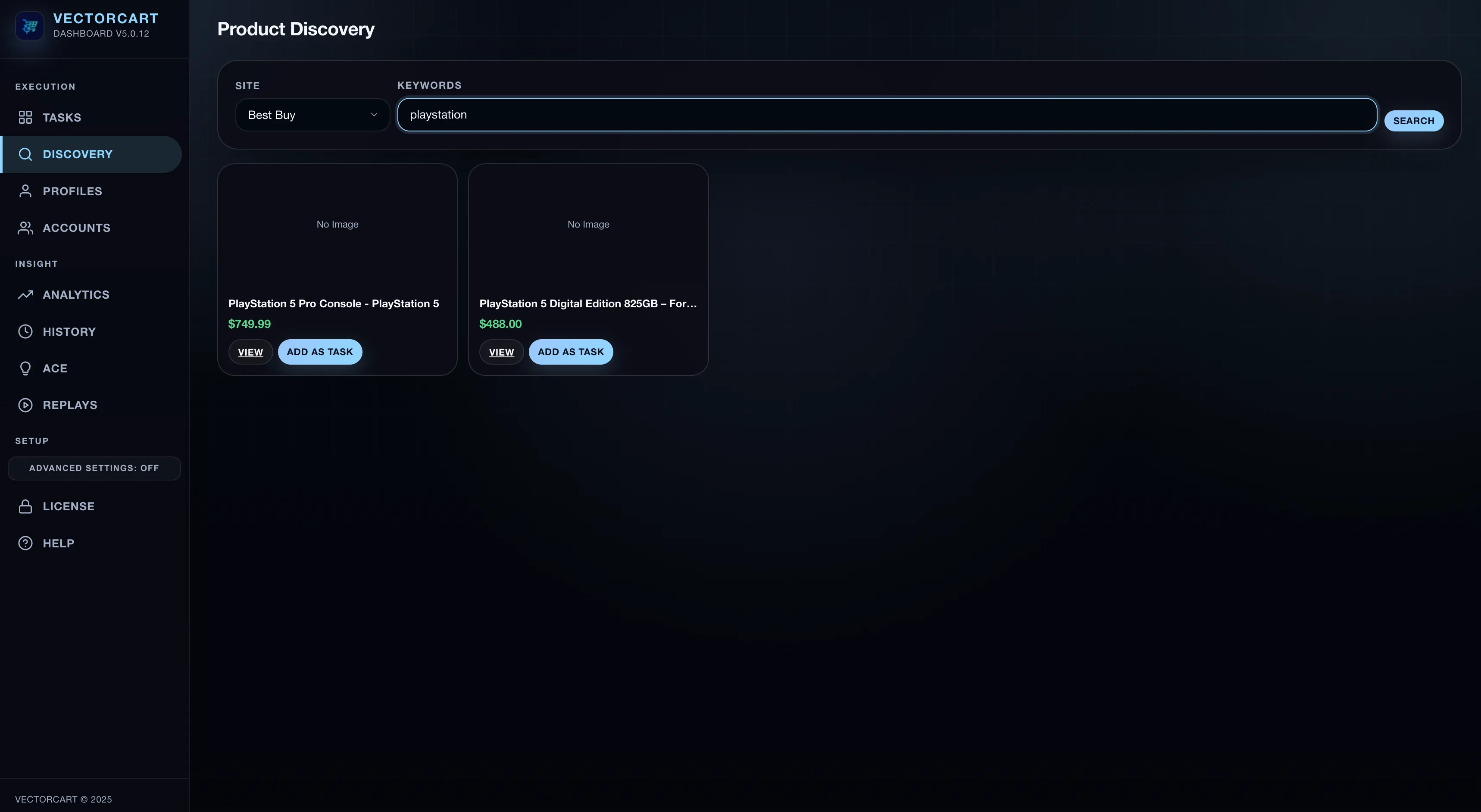
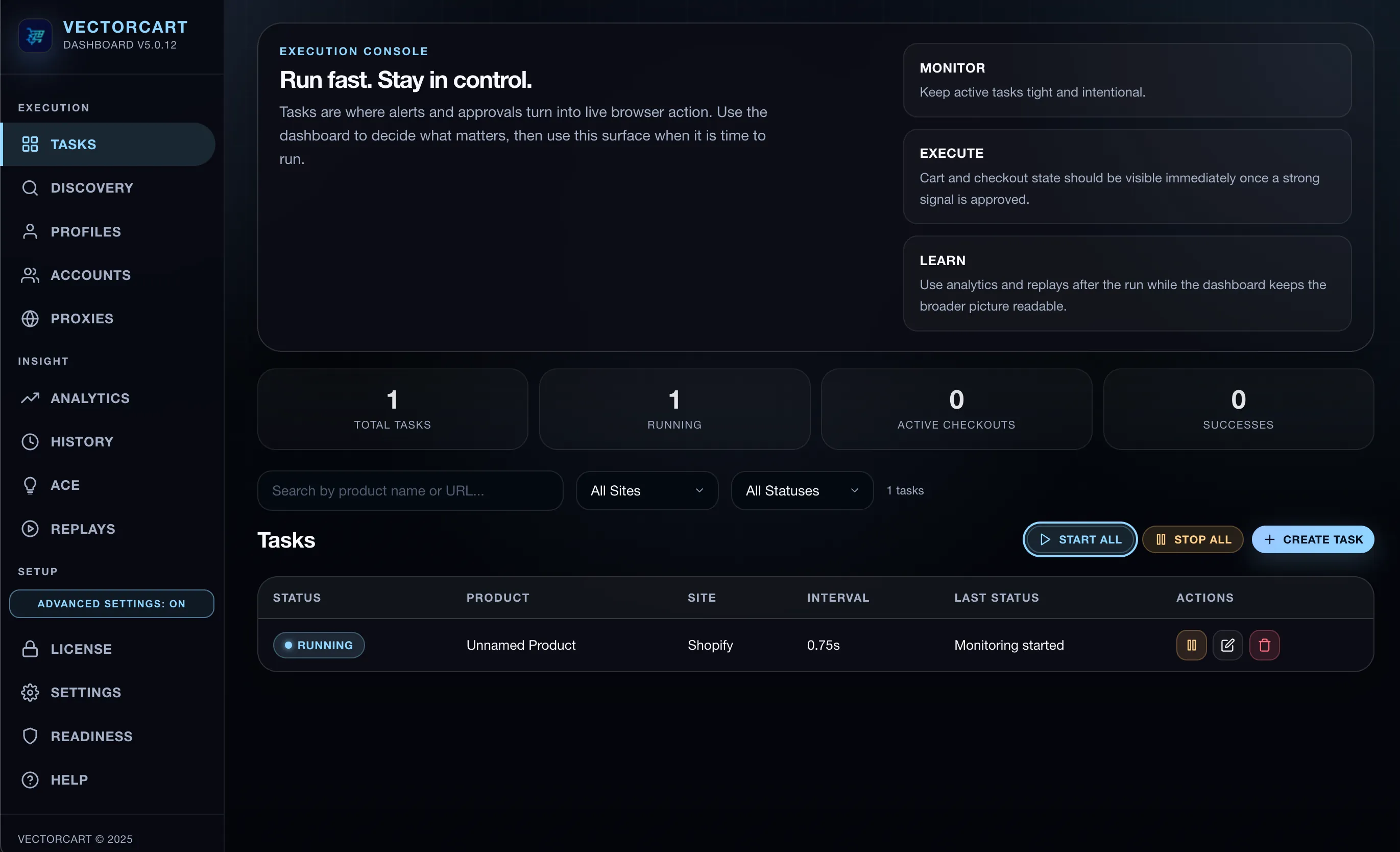
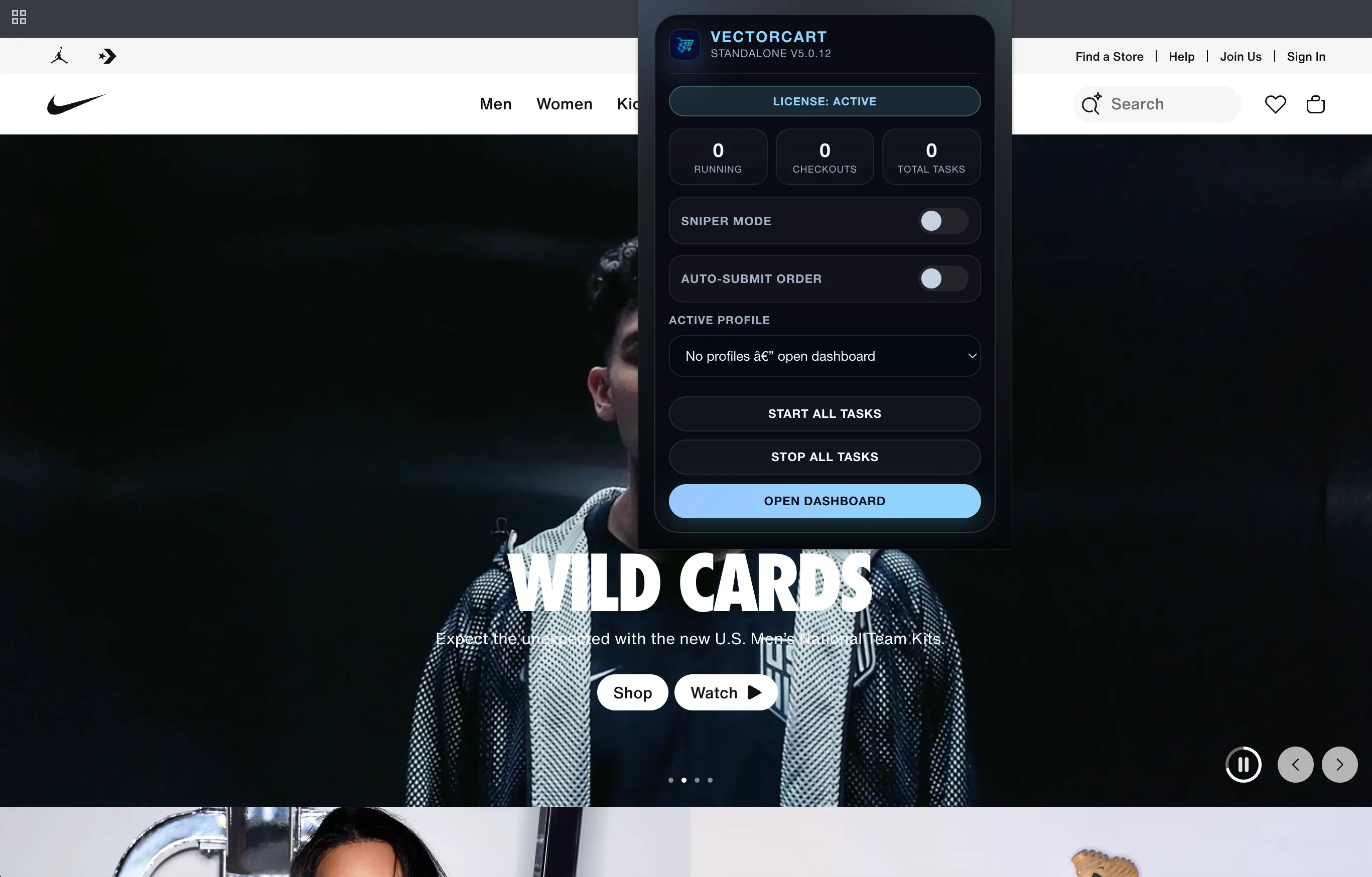
Real product screens, not mockups.
See exactly how customers configure settings, discover products, and launch tasks in the live interface.
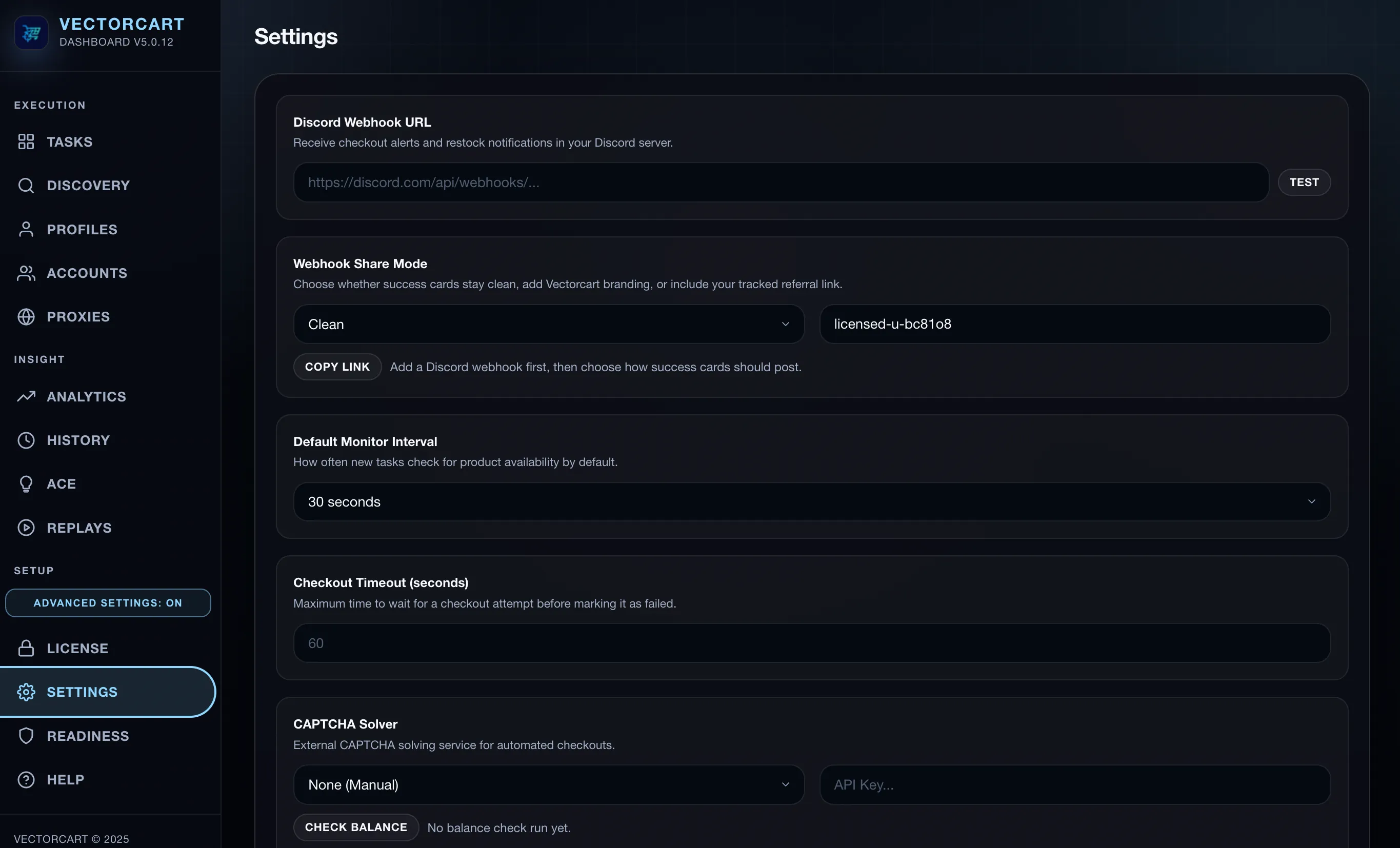
Settings Surface
Webhook routing, cadence, timeout, and CAPTCHA controls in one panel.
Discovery Workflow
Search by store + keyword and convert a result directly into a task.
Task Builder
Preset, profile, proxy, and mode controls before launch.
Popup Controls
Fast run-state controls without leaving the active tab.
The Engine Advantage
Engineered for 24/7 reliability.
We've built an execution-first platform that combines a persistent browser background layer with an elite stealth execution engine.
Persistent Monitoring
Our persistent background service stays active 24/7, ensuring you never miss a stock drop due to browser inactivity while maintaining a lightweight footprint.
Shopify Queue Bypass
Pre-authorize checkout sessions and swap for hyped variants at drop time. v6.0 allows you to skip the line entirely on high-heat drops.
Local Captcha Solver
Achieve sub-second "One-Click" captcha tokens by logging into your high-reputation Gmails directly in our internal harvester window.
Proxy Success Heatmap
Our intelligent routing engine automatically detects which proxies are winning on specific sites and prioritizes them for your most critical tasks.
Go Deeper
Follow the product story from the angle you need.
Each page answers a different question: how Vectorcart works, where support is strongest, what the plans include, and what the real UI looks like.
How It Works
See how the extension execution layer, dashboard control layer, and ACE fit together.
Store Support
Review the strongest lanes, headed browser paths, and account-state requirements before you start.
Plans
Compare Basic and Pro so you can choose between the starter build and the broader operating surface.
Product Tour
Walk through real Vectorcart screens before you install the starter build or move into Pro.
Guides
Read practical setup guides for Nike, Pokemon Center, Shopify, and cleaner first-run decisions.
Shopify Support
See where Shopify is a strong underlying path, how presets work, and where store-by-store variability still matters.
Getting Started
Start with proof, then expand.
Start with Basic
Install the free starter build and validate the workflow on your own machine before you pay for more surface area.
Set up the workflow
Connect the extension, open the dashboard, and create your first profile, watchlist, or task with a clean setup.
Run the strongest lanes first
Start with the clearest public support, review replay and history, and only expand once the workflow is behaving the way you expect.
Store Support
Proven lanes. Built to win.
Stop guessing which routes work. We actively test and certify public lanes across major retailers, so you know exactly which paths give you the highest chance of success.
Nike
Foot Locker
Newegg
Pop Mart
Target
Walmart
Best Buy
GameStop
Pokemon Center
LEGO
Strongest Lanes
Nike, Foot Locker, Newegg
These are the clearest public paths today for browser-native monitoring, carting, and checkout progression.
Headed Browser Lanes
Walmart, Best Buy, GameStop, LEGO
These lanes are supported, with the strongest current path in the headed browser lane.
Account-State Lanes
Amazon, Target, Pokemon Center
Amazon, Target, and Pokemon Center can require signed-in account state to finish checkout, even when the broader workflow is supported.
Strongest lanes today are Nike, Foot Locker, and Newegg. Account state can matter on Amazon, Target, and Pokemon Center. A headed browser lane is strongest today for Walmart, Best Buy, GameStop, and LEGO. Results still vary by product, runtime, account state, and retailer friction.
Plans
Start for free. Scale when you're ready to dominate.
Test our workflow risk-free with Vectorcart Basic. When you're ready to run massive parallel tasks and unlock our Pro tools, upgrade to a plan that fits your ambition.
Basic
Free
starter tier
A risk-free way to test the waters. Includes 1 task, 1 profile, and Safe Mode so you can see the speed for yourself without any commitment.
Best for first-time setup validation.
Start Free with Basic
Monthly
$19.99
per month
Unlock unlimited tasks and profiles. Perfect for scaling your setup without a long-term commitment so you can hit drops on your schedule.
Best for scoring immediate drops.
Choose Monthly
Annual
$149.99
per year
The smart choice for serious users. Get all the power of Pro at a discounted yearly rate and dominate highly-anticipated releases all year long.
Lower annual cost for repeat users.
Choose Annual
Lifetime
$299.99
one-time payment
Never pay recurring fees again. Ultimate power, full feature access, and a lifetime of automated checkouts. Buy once, run forever.
Best for ultimate long-term value.
Choose Lifetime
FAQ
Answers before you buy.
What is Vectorcart v6.0?
Vectorcart is an execution-first platform that combines a powerful Chrome extension with a customer dashboard for orchestration. The extension handles 24/7 monitoring and stealth execution, while the dashboard handles task policy, analytics, and replay visibility.
How does the background engine work?
Unlike traditional extensions that "sleep" after inactivity, Vectorcart's background layer is built on a persistent service worker architecture. It stays active 24/7, ensuring your task polling remains constant even when you're not looking at the app.
What is Shopify Queue Bypass?
Our Elite Queue Bypass allows the bot to "wait in line" with a dummy item before a drop occurs. When the hyped item releases, the bot swaps it into the authorized session instantly, skipping the "Waiting in Line" page entirely.
Which store support is strongest today?
Current public lanes include
Nike,
Foot Locker,
Newegg,
Amazon,
Target,
Walmart,
Best Buy,
GameStop,
Pokemon Center, and
LEGO. The strongest lanes today are Nike, Foot Locker, and Newegg. Walmart, Best Buy, GameStop, and LEGO are strongest in the headed browser lane, while Amazon, Target, and Pokemon Center can require signed-in account state.
See store support.
Is there a free starter build?
Yes.
Vectorcart Basic is a separate starter build limited to
1 task,
1 profile, and
Safe Mode only. Paid plans remove starter limits and open the broader operating surface.
See plans.
What changes in Pro?
Paid plans remove starter limits and open the broader operating surface, including Discovery, ACE intelligence, and the rest of the full runtime toolset shipped in Vectorcart Pro.
Why do some stores have runtime requirements?
Because retailer friction is not uniform. Some stores need signed-in account state, and some perform best in a headed browser lane. Vectorcart shows the strongest current path so customers can launch with better odds.
Can broader Shopify stores work?
Yes. Shopify is one of the stronger underlying paths in the product, but results can still vary by store theme, checkout stack, app layers, and anti-bot setup.
See Shopify support.
Does Vectorcart guarantee successful purchases?
No. Vectorcart assists with monitoring and checkout workflows, but product availability, retailer changes, and third-party compatibility can still affect results. Use the Store Support page to choose the strongest current lanes before launch.
Get Started
Start with the free starter build.
Use Basic to confirm the workflow on your machine, then move into the broader operating surface when you need more capacity.
1. Start with Basic
2. Set up extension + dashboard
3. Focus on strongest lanes first
 Vectorcart